




LIVE access
TikTok LIVE access removed: causes and how to recover it
If TikTok removed your LIVE access, check which features you lost, whether the notice gives a reinstatement date and where to appeal the decision.
1. What “LIVE access removed” means
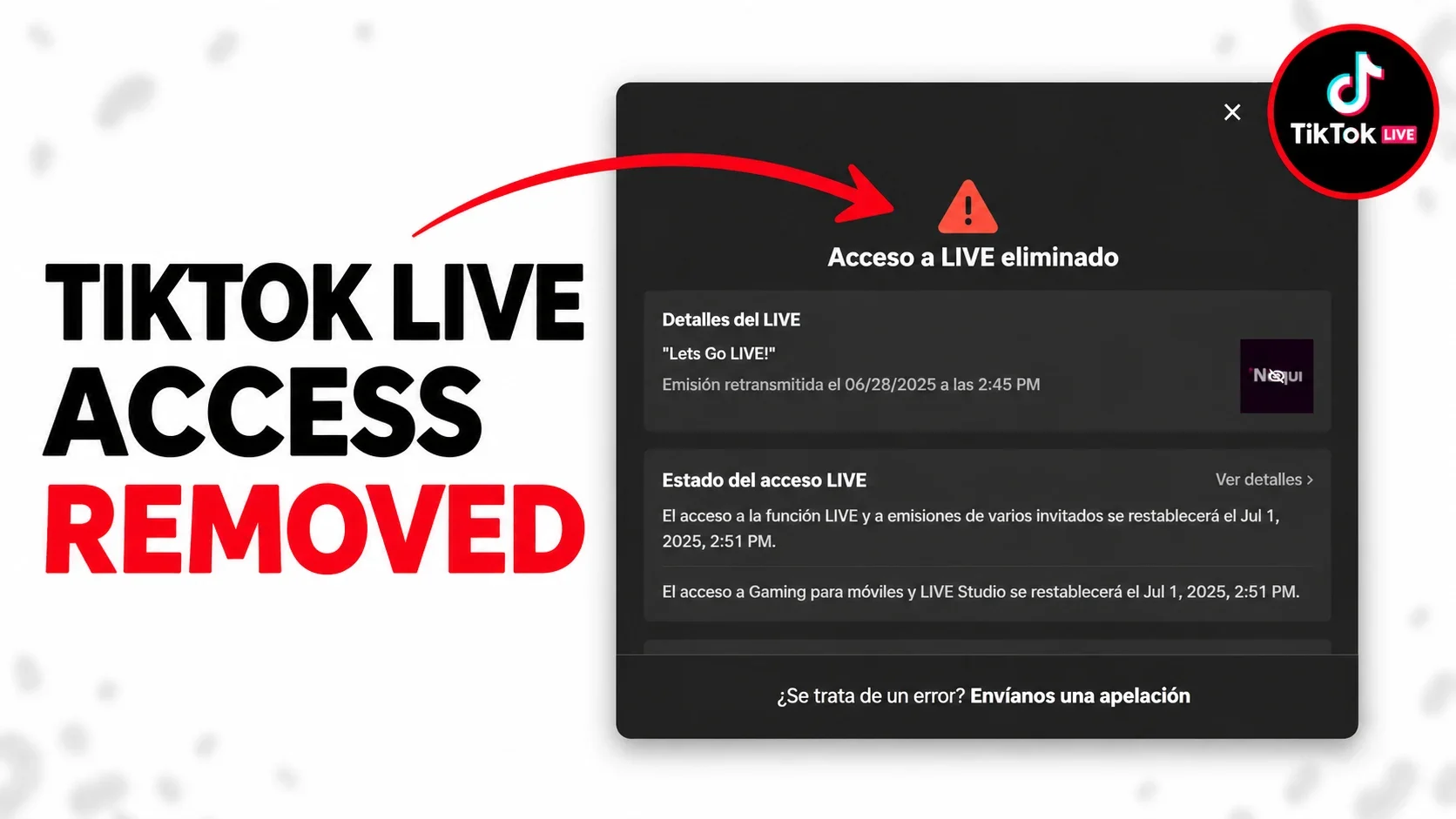
If TikTok removed your LIVE access, open the notice and look for the affected feature, the reason and the duration. Those details tell you whether you can wait for a restriction to expire or ask TikTok to review its decision.
A LIVE restriction does not necessarily mean your entire account is banned. Check which features it names: mobile streaming, guests, mobile Gaming or LIVE Studio. The image in this article shows several affected features, but your case may differ.
If you see a permanent account ban at login, see how to appeal and download your data
- If a reinstatement date is shown, note the day, time and any time zone displayed in the app.
- If access is under review or there is no date, do not assume it will return within 24 or 48 hours.
- If you have never had the LIVE button, check your account’s eligibility. That differs from losing access you previously had.
If you have never had LIVE access, check the age and follower requirements to go live on TikTok
Do not automatically label a restriction a shadowban. Low view counts, reduced recommendations and being unable to start a LIVE are different issues that require different checks.
2. Why TikTok may restrict your streams
Look for the specific reason in your notification. TikTok uses automated and human review. A report can trigger a review, but does not by itself prove a violation.
Original content and copyright
Check any music, films, sports, concerts and third-party videos visible or audible in your stream. Use your own content or obtain permission for that use. Lowering the volume or playing a few seconds does not grant a license. A sound available for TikTok videos is not automatically cleared for every commercial LIVE.
Read the Intellectual Property Policy
Safety, age and conduct
- Sexually explicit content, exploitation of minors or situations that put people at risk.
- Violence, threats, harassment, hate or disclosure of other people’s private information.
- Scams, gambling and promotion or sale of restricted goods.
- Not meeting the minimum age of 18 to go LIVE, or not completing requested age checks.
Gifts, advertising and stream quality
Pressuring viewers for Gifts, offering fake incentives or rebroadcasting other people’s content may affect visibility or LIVE features. Limited interaction does not automatically mean a suspension: reduced recommendations and loss of access are different outcomes.
Turn on the commercial content disclosure when promoting a brand, product or service. Mentioning other networks is not universally prohibited, but links and external sales have rules. In markets with TikTok Shop, directing purchases off-platform may reduce LIVE visibility; Shop also has specific policies.
3. How to get LIVE access back on TikTok, step by step
Save the notice and check the reason
Take a complete screenshot and record your username, stream time, stated violation and affected features. Keep context or a recording that can help explain what happened.
Appeal if you believe there was a mistake
Use the appeal option in the notice when available. You do not have to wait until the restriction expires to report an error. Explain the facts and attach relevant evidence, such as permission to use the content.
If you cannot find the notice, check Inbox → System notifications → Account updates. To request help, go to Profile → Menu → Settings and privacy → Report a problem. Labels and options may vary by version.
If the deadline has passed, check for technical issues
- Check that you are using the correct account and that there is no other active notice.
- Update TikTok and LIVE Studio if you use it, then close and reopen the application.
- Restart your device. On mobile, try clearing only the cache through TikTok’s settings.
- For connection problems, compare your Wi-Fi with another trusted connection. This helps isolate network faults; it does not lift restrictions.
- If access is still blocked, report the issue with the screenshot and the reinstatement date that has already passed.
Message template for support
Hello. My username is @username. My access to [LIVE / LIVE Studio] has been restricted since [date]. The notice states [reason] and [reinstatement date, if shown]. I am requesting a review because [specific explanation]. I have checked [steps taken] and attached [screenshots or evidence]. Could you confirm the restriction’s status and any step I need to complete? Thank you.
Adapt the message to what actually happened. If the appeal is rejected, review the response and use any further options TikTok offers. Keep the case number and avoid sending identical requests repeatedly. No outside provider can guarantee approval or a response time.
4. What to check before your next LIVE
- Prepare a topic and a short outline; check what viewers will see and hear before starting.
- Check music and video permissions. For commercial content, confirm that the license covers the intended use.
- Enable commercial disclosure when required and avoid misleading promises to obtain Gifts.
- Moderate guests, on-screen comments and tools that read messages aloud.
- Hide notifications, documents and personal information before sharing a screen.
- Test audio, camera and connection; prepare original content and a manageable format.
Reviewing recordings can help you correct mistakes, but deleting a post does not remove recorded strikes. Keep the evidence you need for an appeal.
5. BullTok offers professional solutions for people and businesses that need to go live
If live streams are part of your work, business or creative project, you need to know what to check and have the right tools. BullTok offers a professional guide and a proxy IP service to help you prepare your streams and address your setup’s needs.
Guide to permanently removing a TikTok shadowban
Platform secrets and what to do to stream again when you have already tried everything. Includes an AI skill for personalized questions.
Continue
IP UDP TikTok
Clean IP for streaming · SOCKS5 with UDP · 150 Mbps
ContinueProfessional guide: practical tips and hacks to review your case
Explore shadowbans and the steps you can review when you cannot stream. The guide includes a skill for a compatible AI, allowing questions about your case grounded in its content. Its hacks are practical educational tips; they do not replace an appeal or guarantee removal of a restriction.
Proxy IP for your streaming setup
IP UDP TikTok offers SOCKS5 with UDP support and country selection for setups that require a different outgoing IP. Ask support about equipment compatibility and configuration. Stability depends on your connection and routing; a proxy does not remove an account sanction.
Unsure which resource fits? Tell us what the notice says, whether you use mobile or PC, and what you have already tried.
6. Did TikTok block your LIVE? Accounts for PC or mobile streaming
When TikTok removes LIVE access, you cannot start the affected streams with that account while the restriction remains active. Streaming requires an account with access enabled. At BullTok you can buy a TikTok account with Live Studio access for PC streaming, or a live ready account for mobile, depending on your equipment.
Once you can stream again, a new account can give a format aimed at another country a home of its own. If you also use a new residential IP for that audience, you can track comments and watch time for the series from its first LIVE.
TikTok Live Studio account
Professional streams from your PC with OBS
Continue
TikTok Live Mobile account
Go live from your phone from day one
ContinueChoose Live Studio to stream from your PC, or Live Mobile to use your phone. Check each product page for countries, available options and delivery terms to start with access prepared.
Buying another account does not reactivate the original or guarantee permanent access. TikTok may sanction the use of other accounts to evade an active restriction. Review your situation and the rules before using them.
7. Frequently asked questions
Why does TikTok say “LIVE access removed”?
Because it detected a possible violation in a stream or on the account, or the account no longer meets a requirement. The LIVE access removed notice shows the reason, the affected features and, if there is one, the reinstatement date.
How do I get LIVE access back on TikTok?
Open the notice, check the reason and reinstatement date, and appeal if you believe there was a mistake. If the date has passed, update the app, check your connection and report the problem with a screenshot of the notice.
How long does a LIVE restriction last?
There is no single duration for every case. Use the notice’s date when provided. For pending reviews or permanent measures, check the status and options TikTok displays.
Can I appeal before the reinstatement date?
Yes, when the notice offers an appeal and you believe there was a mistake. You do not need to wait until the deadline to use that option.
Will a proxy IP or a new account fix the restriction?
An IP is a connection tool; another account is a separate product. Neither removes the sanction on the original account. Do not use them to evade an active restriction.
Is mentioning a business or WhatsApp always prohibited?
Not universally. The content, commercial disclosure, market and specific TikTok Shop rules matter. Pay particular attention to calls to purchase outside the platform.
8. Choose your next step
Start with the notice and keep your evidence. Appeal a mistake; if the deadline has passed, check the status and rule out technical issues. When you need to configure your connection, start with Live Studio or investigate further, explore the shop resource that fits your situation.
This article combines editorial guidance with links to B TOK’s own products. TikTok makes access and moderation decisions.
Article sources
- Read the Intellectual Property Policy
- Read the LIVE and external links rules
- How to disclose commercial content on TikTok
- Official information on violations and appeals
- How to report a problem
These references explain the rules or operation of each service. Check TikTok for the features and notices that apply to your account.